
About FaiTerm
FaiTerm (Future AI Terminal GUI) brings local terminals, SSH and SFTP, Telnet, FTP and serial connections, dual-pane file management, command completion, an AI Agent and knowledge base, and host tools into one workspace. It runs on Windows, macOS, Linux, and Android.
Where to start
| I want to… | Read this |
|---|---|
| Install and launch FaiTerm | Installation |
| Learn the four-panel workspace | Workspace |
| Connect to a server or open a local/WSL terminal | Connections and Hosts |
| Transfer and manage files | Files and Transfers |
| Let AI run commands with my approval | AI Agent |
| Inspect processes, ports, and resource usage | Host Tools and Monitoring |
| Change colors or shortcuts | Themes · Keyboard Shortcuts |
| Keep data aligned across devices | Account and Sync |
| Use FaiTerm on Android | Mobile |
At a glance
Terminal
- Local shells on Windows, macOS, and Linux, with WSL distributions on Windows
- SSH, SFTP, Telnet, FTP, and serial connections in one searchable host list
- Nested terminal splits, command history, quick commands, and in-terminal port forwarding
- More than 600 command definitions with subcommand, argument, path, history, and alias suggestions
- Terminal highlighting, configurable Shell Integration, clickable file paths, and text search
Files
- Dual-pane local/remote browsing over SFTP
- Drag-and-drop transfer queues with Dock or taskbar progress
- ZModem (
sz/rz) support for transfers started inside the terminal
AI and knowledge
- Ask mode for questions that do not touch your environment
- Agent mode bound to a terminal, with per-command approval, blocked dangerous commands, a run limit, and a command denylist
- OpenAI, Anthropic, Gemini, DeepSeek, Kimi, Qwen, GLM, MiniMax, Ollama, and OpenAI-compatible providers
- Searchable conversation history, notebook retrieval (RAG), and local MCP tools
Host tools and personalization
- Processes, services, Docker, tmux, scheduled tasks, and listening ports
- CPU, memory, disk, and network monitoring for the current terminal host
- Application and terminal themes, background images, acrylic effects, and a configurable command palette
- Password, key, and passphrase management, encrypted local storage, and account-based sync
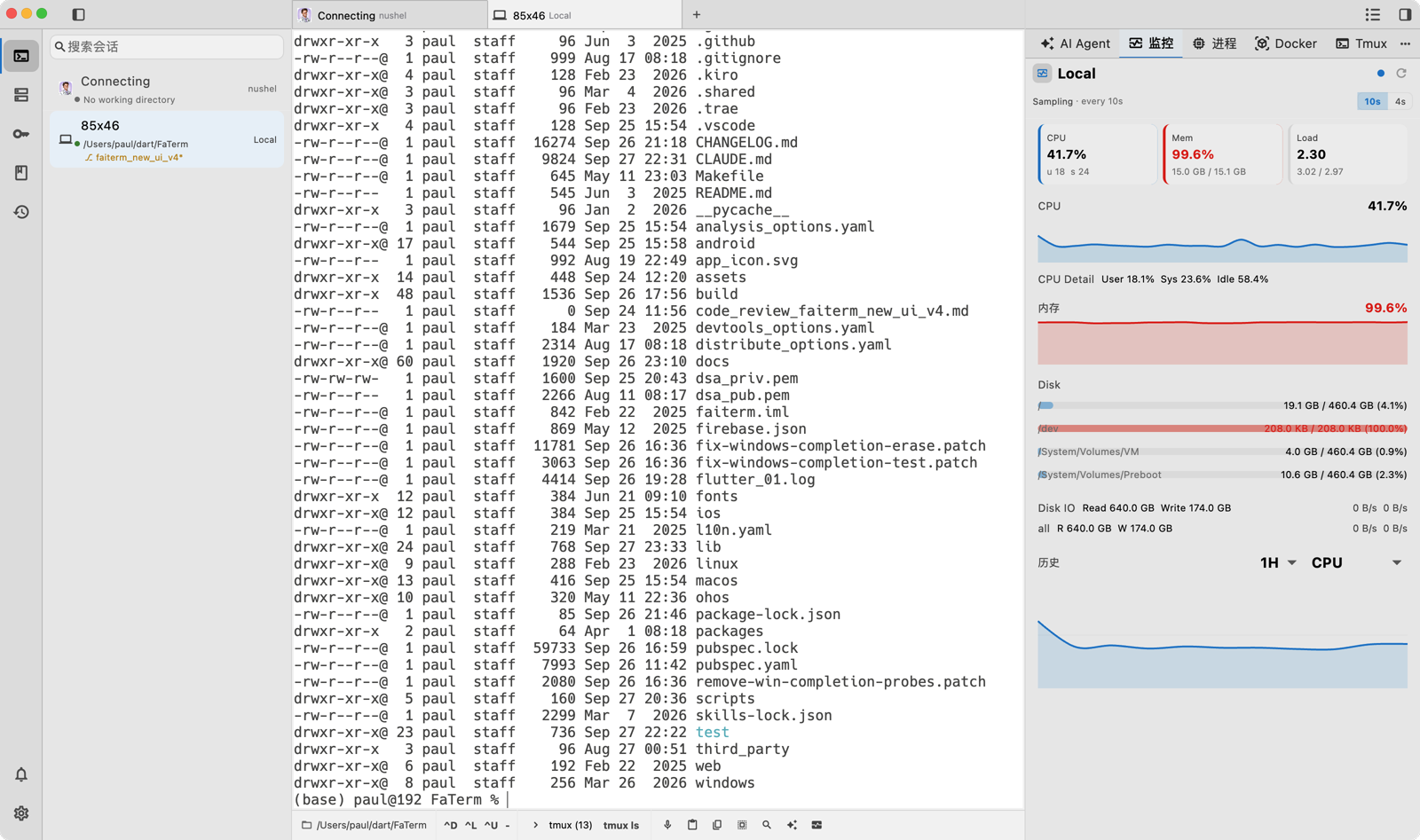
Workspace layout
| Area | Contents |
|---|---|
| ① Tool rail | Workspaces, hosts, secrets, notebooks, history, notifications, and Settings |
| ② List panel | Contents for the selected rail item; resizeable and collapsible |
| ③ Workspace | Terminal, file manager, notebook, and code editor tabs |
| ④ Tool collection | AI, monitoring, processes, Docker, tmux, services, scheduled tasks, and ports |
The terminal status bar belongs to the workspace. It exposes the current path, common control characters, tmux status, and terminal actions.
Platforms
- Desktop: Windows 10+, macOS 14+, and major Linux distributions
- Mobile: Android 8+, with remote terminals, file management, notebooks, and AI chat
Ready to get started? See Installation.